Step by step Guide to add Yahoo chat box into your Website/blog:
This tutorial is not going to be technical apart from few settings which you will you be doing at Pingbox studio to customize look and feel of Yahoo chat box widget which you will be adding on your blog. The whole process can be sum-up in 3 steps:- Create Pingbox
- Customize
- Embed code on your Website
Create a PingBox:
Go to yahoo Pingbox site and click on Create a Pingbox.
 Click on save and you will be served with code which you can quickly add it into your site. You can customize the widget size and add it into your blog quickly.
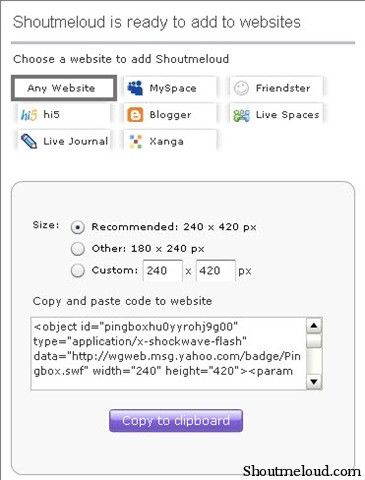 I believe this is very simple. I can see two-three smart usage of this tool for bloggers. You can set a time on every weekend and you can add this widget into your blog and can take readers questions and feedbacks. This will work for blogs which has a community around it. For service blog, it is a great tool, since users can ask any questions directly.
It’s up to you how you use this feature of yahoo chat box, though make sure don’t rely on it completely for serious usage, as visitor information is anonymous, so for serious business opt for some useful Online feedback services. Meanwhile, have you used Pingbox before or this is the first time you are hearing about this useful service from Yahoo.
Though usage are unlimited, only thing is you need to think out of the box. I would love to see what idea you can come up with as practical usage of this tool.



7 Nhận xét
For a change, there is an article that focuses on a specific topic and is not all over the places. I like the fact that it is actually problem-solving and not just random and baseless subject. Great going!
Trả lờiXóacollege essay help
academic essay
homework essay
my assignment help
online statistics homework help
pay for homework
complete course work for me
economics homework help
cheap assignment writing service
college assignment
assignment help service
mba assignment help
assignment help usa
best assignment help
economics assignment help
academic assignment writing
best online assignment help
online assignment help india
account assignment help
case study assignment writing
thesis writing help
Just wanted to convey my regards. This was really a valuable experience. I will ensure that my friends also read this as soon as possible. I cannot wait to share this.
Trả lờiXóaJobs in Dubai
Dubai jobs
Hotels in Dubai
Job in Dubai
Dubai Hotels
Dubai City
Expo 2020 Dubai
World Expo 2020 Dubai
Hello, I have browsed most of your posts. This post is probably where I got the most useful information for my research. Thanks for posting, we can see more on this. Are you aware of any other websites on this subject.
Trả lờiXóaassignment help usa
I blog quite often and I seriously thank you for your content. This great article has truly peaked my interest. I am going to take a note of your site and keep checking for new information about once per week. I opted in for your Feed as well
Trả lờiXóaresearch paper writing help
Thank you so much for the post you do. I would like to leave you and I would like to know more, I would like to bookmark the page so you can have a wonderful job.
Trả lờiXóaassignment writing service
I was able to clear a couple of doubts, for which I’m deeply thankful. It is rare that you come across such an insightful work. A big thumbs up from my side.
Trả lờiXóaGreat Information sharing .. I am very happy to read this article .. thanks for giving us go through info.Fantastic nice. I appreciate this post.
Trả lờiXóaResearch Paper Writing